The final record hides the real process
A CRM stage or project status shows where work ended. The messages, approvals, meetings, and exceptions explain how it got there.
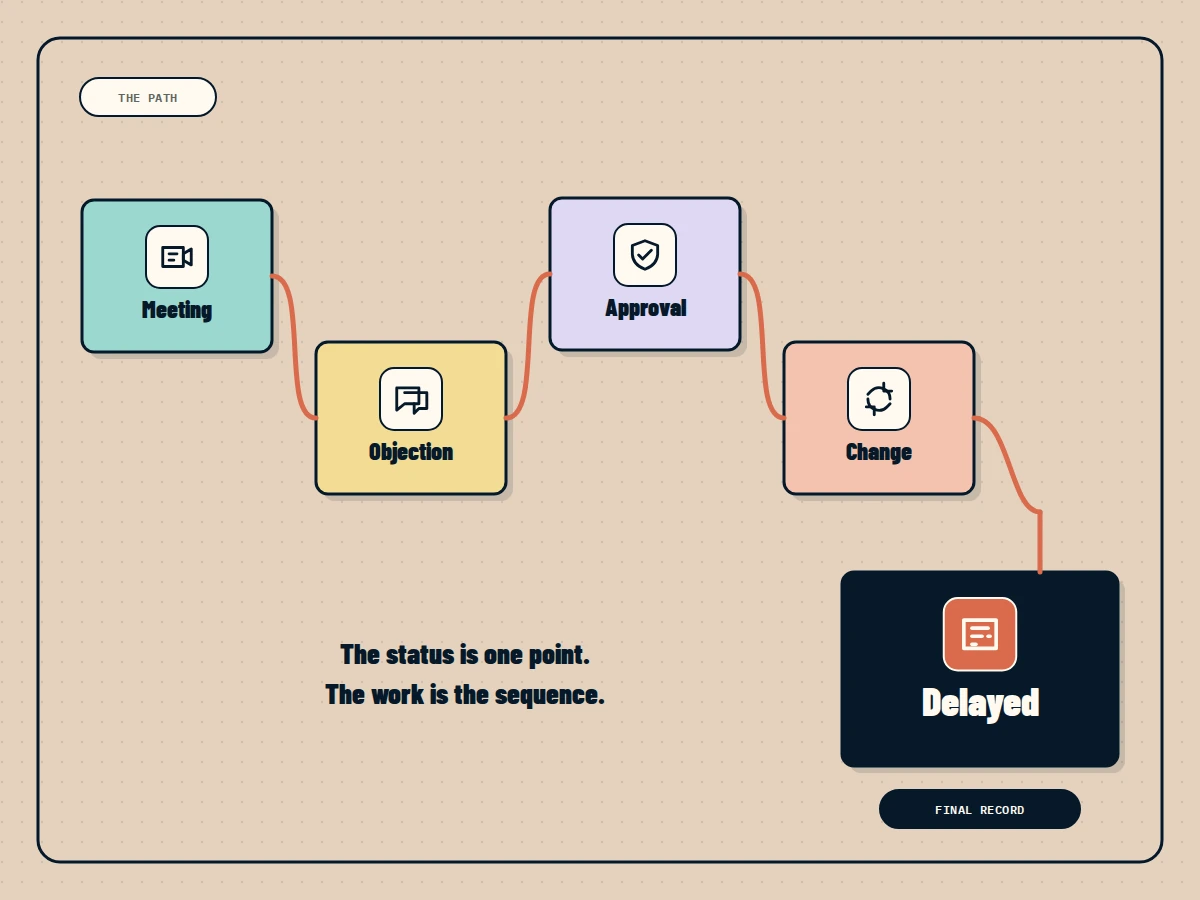
The CRM says the deal is delayed.
That is true. It is not useful enough.
The reason may be a security objection raised in a meeting, a legal question sent by email, and an approval that still has no owner. None of that is visible in the stage field.
The record shows where the work ended. The path explains what the team should do next.
Systems of record preserve the authoritative state
Companies need a clear source for important records.
The CRM owns the customer and opportunity. The HR system owns the employee record. The finance platform owns the invoice. The project tool owns the current task status.
IBM describes a system of record as an authoritative source used as part of master data management. This role matters. Without it, teams argue about which spreadsheet is correct.
The limitation is not the system of record itself. The limitation is expecting one record to explain the full operation around it.
Work happens between state changes
An opportunity moves from proposal to negotiation.
Between those stages, several things happened:
- A customer asked for a custom term.
- Sales discussed the request with delivery.
- Finance approved a limited exception.
- Legal changed a clause.
- The customer requested another meeting.
The CRM may preserve the new stage, amount, and close date. The reasoning remains distributed across email, Slack, meetings, and documents.
When another employee takes over the account, the current record does not explain the sequence.
Events reveal the real path
Process mining starts from event logs: time stamped activities connected to a case. By looking at which activity follows another, a team can discover how work actually moves rather than relying only on the intended process.
The same idea is useful for a Business Brain.
A project can be connected to:
- A customer meeting.
- A scope change decision.
- A document edit.
- A task reassignment.
- An approval.
- A status update.
The system does not need to store every click forever. It needs enough meaningful events to explain changes, delays, ownership, and decisions.
The intended process and actual process differ
The procedure says a refund request goes from support to finance for approval.
In reality, urgent requests are discussed in Slack, a manager approves them verbally, and someone updates finance afterward. The workaround may be sensible, risky, or both.
If the company only documents the intended process, it cannot see the workarounds employees rely on. If it only watches activity, it may confuse an exception with the policy.
A useful system holds both:
- The approved process that should be followed.
- The observed history showing what actually happened.
Differences between them create valuable questions. Is the policy outdated? Is the team skipping a control? Is one approval step creating avoidable delay?
Preserve decisions, not notification noise
Capturing the work trail does not mean sending every message into a permanent knowledge base.
Most notifications are temporary. Some conversations are private. Many events are technically true but irrelevant to future work.
Prioritize information that changes the operating picture:
- A confirmed decision.
- A new commitment.
- A changed owner.
- A blocked dependency.
- An approved exception.
- A material edit.
- A deadline change.
Link the event to its source and the affected record. Keep the source permission intact.
Ask for the difference, not another status report
Instead of asking “What is the project status?” ask:
- What changed since Friday?
- Which decision caused the deadline to move?
- What is blocked and who owns the dependency?
- Which customer commitment has not become a task?
- Where did the current plan come from?
These questions require both the final record and the path that produced it.
Connect the record to the work around it
The Business Brain should not replace the CRM or project tool. Those systems remain responsible for their records.
The Business Brain connects those records to the meetings, messages, decisions, and actions that explain them. An employee can see the current state, understand what changed, and follow the evidence before acting.
The status tells you where the work is.
The history tells you how to move it.
Questions people ask
What is a system of record?
A system of record is the authoritative source for a defined business record, such as a customer, contract, opportunity, employee, or transaction.
Why is the current status not enough?
The status shows the latest state but often omits the sequence of decisions, conversations, delays, exceptions, and ownership changes that explain it.
How can companies capture how work happens?
Connect time stamped events from business systems, messages, meetings, edits, and approvals to the relevant case or project, then preserve important decisions and evidence.