Free tool for LinkedIn outreach: workflow setup
Build a repeatable LinkedIn outreach workflow with a free tool: define a list rule, review messages, check the launch conditions and assign a reply owner.
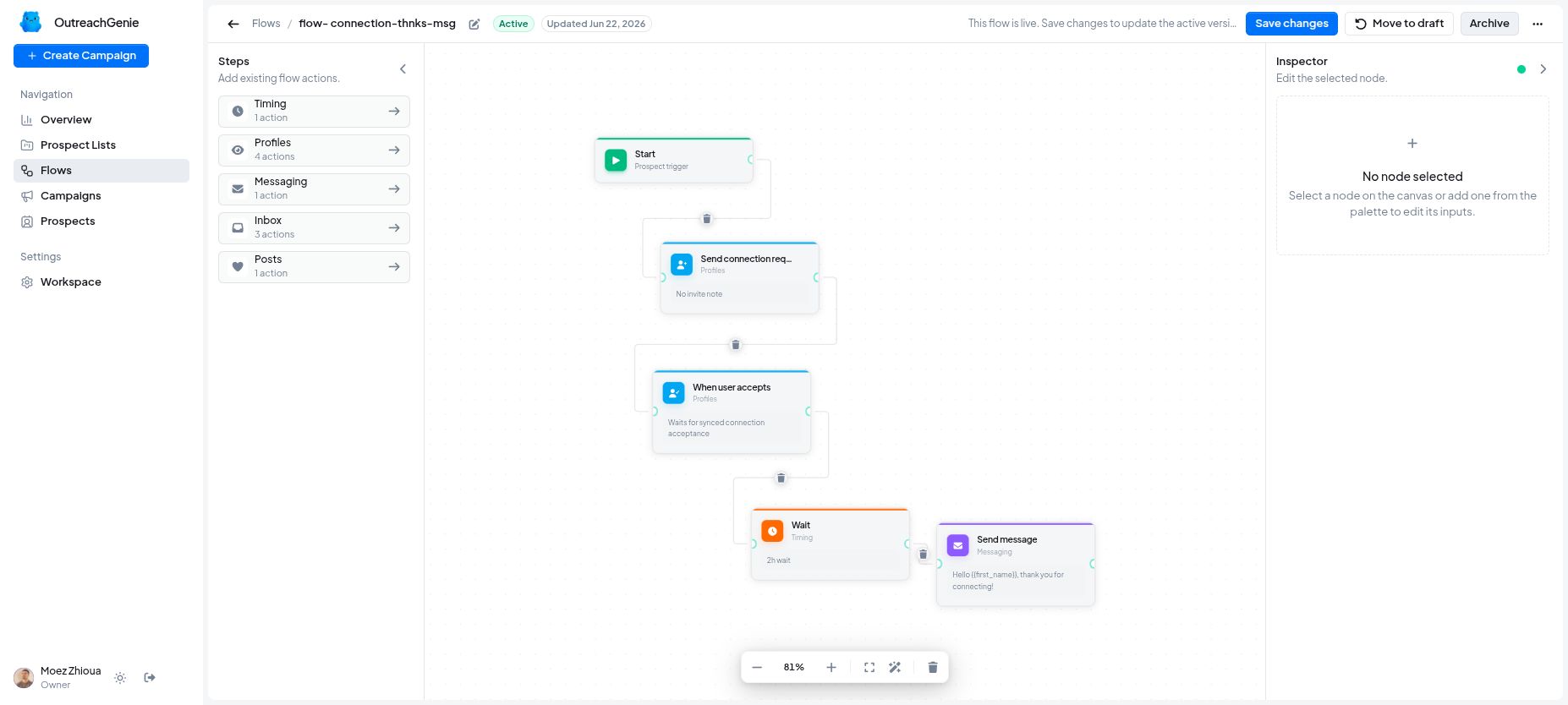
A free tool for LinkedIn outreach can help organize prospecting, but the workflow still needs an owner. Before any message leaves, someone should be able to explain why this person belongs on the list, what evidence supports the message and who will respond if they reply.
At LeanOrchestr, we build and own OutreachGenie. This is our implementation guide for a product we own, not an independent review. The example below shows how to prepare a small, reviewable outreach process. It is an illustrative operating plan, not a customer result or a promise of replies.
What is free, and what still needs checking?
We checked the OutreachGenie pricing page on October 7, 2026. The software is listed at $0 forever, with no card requirement, trial deadline, paid software tier or product-side quotas. Its done-for-you outreach service has separate custom pricing. Free software does not mean someone else is running the process for you.
The product facts describe prospect sources and notes, lists, visual flows, browser-assisted actions and campaign results. Those are useful building blocks. They do not establish that your particular sequence is ready to launch or that a reply will receive the right follow-up.
LinkedIn’s limits still apply. Its official policy on prohibited software and extensions prohibits tools that automate activity on its website and warns that accounts can be restricted. OutreachGenie is not affiliated with LinkedIn. A low daily cap does not make prohibited automation permitted or eliminate restriction risk. Decide whether to use browser-assisted actions before enabling them; the planning and review steps below also work with manual outreach.
1. Write a list rule someone else can apply
Start with one business conversation you can usefully contribute to. Avoid a list rule such as “anyone in operations.” It gives the reviewer no basis for accepting or rejecting a record.
For an agency that helps with operational handoffs, an illustrative rule could be:
Include an operations lead who has publicly described a specific handoff problem that our team can discuss usefully. Keep the source and observation date. Exclude existing active conversations, previous requests not to be contacted and records whose relevance cannot be verified.
A public post is evidence of what the person wrote. It is not proof of purchase intent, budget or permission to send repeated messages. If the source merely says the company is hiring, do not translate that into “their onboarding process is broken.”
Write the inclusion and exclusion rules before collecting more people. Review each record against them and keep uncertain records outside the launch list until someone resolves the uncertainty.
2. Keep a small run sheet beside the list
The list needs enough context for a second person to check the decision. The following fields can live in a simple document or spreadsheet. They are process requirements, not a claim that OutreachGenie automatically creates or enforces them.
| Field | What to record |
|---|---|
| List purpose | The specific conversation the campaign is meant to start. |
| Source and date | A link to the relevant public statement and when it was checked. |
| Verified observation | What the source actually supports, separated from assumptions. |
| Exclusion check | Whether there is an existing conversation or a request to stop contact. |
| Draft and reviewer | The message text and the person who checked its relevance. |
| Launch owner | The person authorized to decide whether the work can start. |
| Reply owner | The named person who will inspect responses and decide the next action. |
| Current state | Needs review, ready, contacted, reply received, closed or needs investigation. |
Use states your team can distinguish. “Ready” should mean the review is complete. “Contacted” should mean there is evidence of an actual action. “Interested” should require a response that supports that conclusion.
This follows the same principle as our business process automation consulting guide: define the work, its completion evidence and its owner before deciding which parts to automate.
3. Draft a flow around decisions
Sketch the intended sequence before configuring it. For a first version, one relevant message and a deliberate review point may be enough. Each additional follow-up creates another condition to check.
Write out these decisions in plain language:
- Is the person still relevant, and is there already an active conversation?
- Is the proposed message appropriate to the actual relationship and available LinkedIn messaging options?
- Does every personalized statement come from a checked source?
- What happens if the person replies, declines, asks for no further contact or never responds?
- Who investigates a pending action or an error before anything is retried?
OutreachGenie’s visual flows can represent outreach steps, but a readable diagram does not prove the outcome of every branch. Inspect the specific flow you intend to use. Do not infer that a step named “Check reply” guarantees that every later message will stop.
Treat the first version as a draft to review. The operating checklist remains outside the product unless you have verified an equivalent control inside it. Our OutreachGenie case study shows the existing list, flow and campaign views if you need to understand how those pieces fit together.
4. Make launch a separate decision
A completed draft is a candidate for launch. The launch owner should inspect the actual list and message, rather than approving an abstract description of the campaign.
Use this checklist before the first action:
- Every included person meets the list rule, with an accessible source for the message’s claim.
- Existing conversations and previous stop requests have been checked.
- The final text contains no unresolved placeholders, invented familiarity or unsupported promises.
- The exact behavior after a reply, no reply, failure or interrupted browser session is understood.
- The reply owner has time to inspect the work and knows how to pause or stop the campaign.
- The team has decided whether to use manual outreach after reviewing LinkedIn’s policy.
If the behavior of a flow is unclear, leave it unlaunched. Review its configuration and current product documentation before using it with real prospects. Do not create unwanted messages simply to find out how a branch behaves.
5. Give replies a named owner
“The sales team will handle it” is difficult to operate. Name one person, a backup and an inspection schedule that fits the work they can actually cover. These are team responsibilities; they do not depend on an assumed shared inbox or automatic assignment feature.
When a reply arrives, the owner reads it before deciding the next step. A request for information, a correction, a refusal and a request to stop need different actions. Record that decision beside the prospect context so the next person does not restart the original sequence by mistake.
Plan around the scope of the controls available. Campaign pause and stop actions affect the campaign; do not assume they remove only one person. If further sending must halt, pause the campaign, inspect queued work and establish a verified way to exclude the affected person before considering a restart. Never continue outreach after a request to stop.
6. Review exceptions before adding volume
At the first review, examine a few records from source through outcome. Can the owner explain why each person was included? Does the recorded state match what actually happened? Could a replacement operator tell what to do next?
Record gaps such as missing context, unexplained pending actions, errors, unhandled replies and extra operator work. If a message’s outcome is uncertain, inspect the conversation before retrying; an error label alone is not a reason to send the same message again.
Use your own observations to decide what to change. This guide supplies no reply-rate benchmark or “safe” universal message volume. A larger list only makes an unresolved operating problem harder to review.
You can explore OutreachGenie to see whether its free workspace fits this process. Bring a list rule, a draft and a reply owner to the evaluation. Those three decisions make the tool easier to assess and the resulting workflow easier to operate.
Questions people ask
Is OutreachGenie a free tool for LinkedIn outreach?
Its public pricing on October 7, 2026 lists the software at $0 forever, without a credit card, trial deadline, paid software tier or product-side quotas. LinkedIn's own limits and policies still apply. The separately priced done-for-you service is not included.
What should be ready before starting an outreach campaign?
Prepare a reviewed list, evidence for each message, a checked draft flow, a named person responsible for replies, and a documented way to halt further outreach. Keep the campaign unlaunched while any of these remains unresolved.
Does a free outreach tool remove LinkedIn account risk?
No. LinkedIn prohibits software that automates activity on its website and can restrict accounts. Product pacing controls do not make prohibited activity permitted. You can use the planning and review checklist with manual outreach instead.
Does this workflow require CRM integration or shared inbox permissions?
No. The operating record can be a simple run sheet maintained by the responsible people. CRM sync, shared inbox access and role-based assignments are separate requirements to verify, not assumed OutreachGenie features.